
The Building Blocks of Code: A Complete Guide to Variables and Data Types
Imagine you are moving into a new house. You have a mountain of boxes, and each one contains something different—kitchen utensils, books, or delicate glassware. To keep things organized, you put a label on each box and make sure the box is the right size for what’s inside. You wouldn’t put a heavy anvil in a small shoebox, right?
In the world of coding, Variables and Data Types are those boxes and labels. They are the absolute foundation of every piece of software ever written, from the simple calculator on your phone to the complex algorithms powering space shuttles.
If you’ve ever felt overwhelmed by technical jargon, don’t worry. In this guide, we are going to strip away the complexity. We will explore how computers store information, why “types” matter, and how you can use this knowledge to write better, faster code. Whether you are just starting your journey or looking to brush up on the fundamentals, this deep dive is for you.
What are Variables and Data Types?
Let’s start with a clear, jargon-free definition.
What is a Variable?
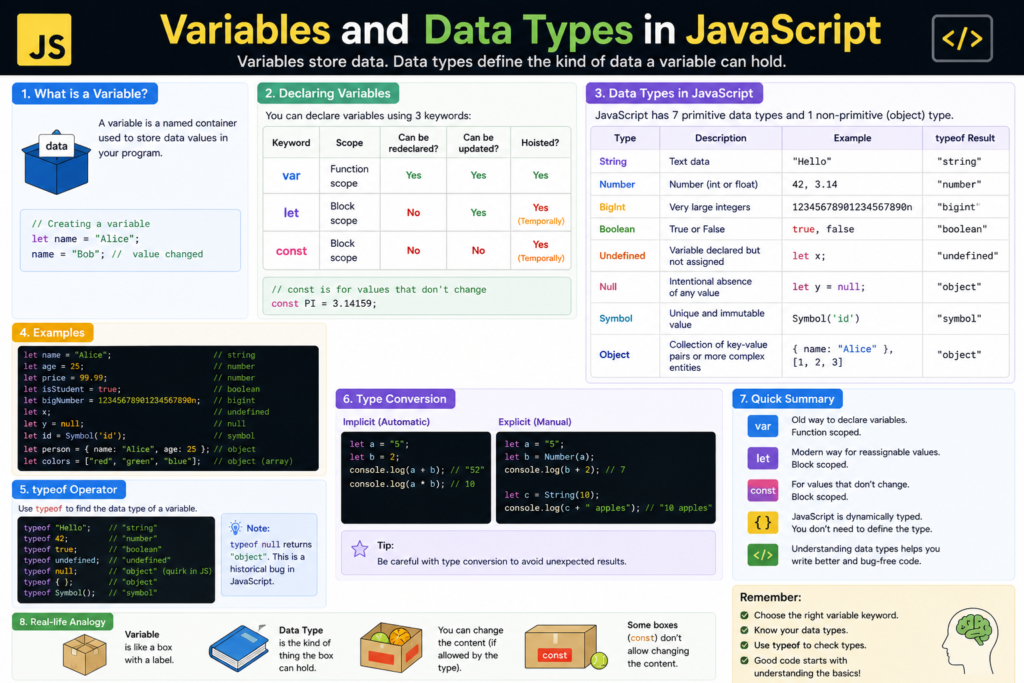
A variable is a named container used to store data in a computer’s memory. Think of it as a “placeholder” or a “nickname” for a specific value. Instead of remembering exactly where a piece of information is hidden in the computer’s vast RAM, you give it a name like userAge or totalPrice.
What are Data Types?
While a variable is the “box,” the data type is the “category” of what’s inside. Computers process different kinds of information differently. A computer needs to know if a piece of data is a number (so it can do math) or a piece of text (so it can display it on a screen).
By defining a data type, you are telling the computer:
- How much space to set aside in memory.
- What kind of operations can be performed on that data.
💡 Pro Tip: In many modern languages like JavaScript or Python, the computer is smart enough to guess the data type for you. This is called Dynamic Typing. In others, like C++ or Java, you must state the type explicitly (Static Typing).
Why are Variables and Data Types Important?
You might wonder, “Why can’t I just throw everything into the computer and let it figure it out?” Well, without clear variables and data types, programming would be chaos.
1. Memory Efficiency
Computers have a limited amount of memory (RAM). An integer (a whole number) takes up much less space than a long paragraph of text. By using the correct data types, you ensure your program runs smoothly without hogging all the system’s resources.
2. Preventing Errors
Imagine trying to subtract the word “Apple” from the number 50. It doesn’t make sense! Data types act as safety rails. They prevent the computer from attempting impossible operations, which helps avoid “crashes” and bugs.
3. Readability and Maintenance
Code is read by humans much more often than it is run by computers. Using descriptive variable names and consistent data types makes your code look professional. It allows other developers (or “future you”) to understand what the program is doing without needing a secret decoder ring.
Core Concepts Explained: The Step-by-Step Guide
Let’s break down the most common data types you will encounter in almost every programming language.
1. Numbers (Integers and Floats)
Numbers are the bread and butter of programming. Usually, they are split into two categories:
- Integers: Whole numbers without decimals (e.g., 5, -42, 1000).
- Floats (or Doubles): Numbers with decimal points (e.g., 3.14, -0.001, 19.99).
2. Strings (Text)
A String is a sequence of characters. It can be a single letter, a word, or an entire book. Strings are almost always wrapped in “quotes.”
- Example: “Hello World”, “user_123”, “12345” (Note: Even though 12345 is a number, inside quotes, the computer treats it as text).
3. Booleans (True/False)
Named after mathematician George Boole, a Boolean can only have two values: True or False. These are used for logic. Is the user logged in? True. Is the game over? False.
4. Arrays (Lists)
Sometimes you need to store a collection of items. Instead of creating ten variables for a grocery list, you use an Array.
- Example: [“Apples”, “Bananas”, “Milk”]
5. Objects (Key-Value Pairs)
Objects allow you to group related data together. If you want to describe a person, you might give them a name (String), an age (Integer), and a status (Boolean).
- Example: { name: “John”, age: 25, isMember: true }
Practical Examples: Seeing Variables in Action
Let’s look at how we declare and use variables in JavaScript, one of the most popular languages in the world.
The Old Way vs. The Modern Way
In the past, programmers used var. Today, we use let and const.
// A variable that can change (Mutable)
let score = 0;
score = 10; // This is allowed!

// A variable that stays the same (Immutable)
const pi = 3.14159;
// pi = 4; // This would cause an ERROR!

// Using different Data Types
let playerName = "CyberKnight"; // String
let lives = 3;                  // Integer
let isGameOver = false;         // Boolean
Why use const?
Whenever you have a value that shouldn’t change (like your birth year or a mathematical constant), use const. It protects your data from being accidentally overwritten later in the program.
Common Mistakes to Avoid
Even seasoned pros make mistakes with variables and data types. Here are the most common pitfalls:
1. Confusing Strings and Numbers
This is a classic. In many languages, if you try to “add” a string and a number, you get a weird result.
- “5” + 5 might result in “55” (text joining) instead of 10 (math).
- The Fix: Always ensure your types match before doing calculations.
2. Poor Variable Naming
Avoid names like x, y, or data1. These mean nothing.
- Bad: let d = 31;
- Good: let daysInMonth = 31;
3. Forgetting Case Sensitivity
In most languages, UserAge and userage are two completely different variables. Pick a naming convention (like camelCase) and stick to it religiously.
Pro Tips & Best Practices for Clean Code
If you want to write code that looks like it was written by a senior engineer, follow these rules:
- Use camelCase: Start with a lowercase letter and capitalize the first letter of each subsequent word (e.g., totalAccountBalance).
- Keep it descriptive: A variable name should tell you exactly what is inside. If you have to ask “What does this variable do?”, the name isn’t good enough.
- Minimize Global Variables: Try to keep your variables inside the functions where they are needed. This prevents “spaghetti code” where one part of your program accidentally ruins another part.
- Initialize your Variables: Don’t just declare a variable; give it an initial value (like 0 or “”). This prevents “undefined” errors later on.
Real-World Use Cases
How are these concepts used in the apps you use every day?
1. Social Media Profiles
When you look at a profile, the app is pulling variables:
- username (String)
- followerCount (Integer)
- isPrivateAccount (Boolean)
- recentPosts (Array of Strings or Objects)
2. Banking Apps
Accuracy is everything here.
- accountBalance (Float)
- transactionHistory (Array of Objects)
- isIdentityVerified (Boolean)
3. Video Games
- playerHealth (Integer)
- inventoryItems (Array)
- playerCoordinates (Object with x and y floats)
Mini Project: The “User Greeting” Script
Let’s put it all together. We want to create a script that stores information about a user and prints a personalized message.
The Plan:
- Store the user’s name.
- Store their age.
- Calculate how many years until they turn 100.
- Print the result.
The Code (JavaScript):
// Step 1: Declare Variables with correct Data Types
const userName = "Alice"; // String
let userAge = 28;         // Number
const targetAge = 100;    // Number

// Step 2: Perform Logic
let yearsLeft = targetAge - userAge;

// Step 3: Output the result
console.log("Hello " + userName + "!");
console.log("You are " + userAge + " years old.");
console.log("In " + yearsLeft + " years, you will be 100!");
In this tiny project, we used Strings, Numbers, Constants, and Let variables to create a functional piece of logic!
Frequently Asked Questions (FAQs)
1. What is the difference between null and undefined?
This is a tricky one! undefined means a variable has been declared but hasn’t been given a value yet. null is an intentional assignment that represents “nothing” or “empty.” Think of undefined as a box you haven’t put anything in yet, and null as a box you purposely left empty.
2. Can a variable change its data type?
In “dynamically typed” languages like Python or JavaScript, yes. You could start with x = 5 and then change it to x = “Hello”. However, in “statically typed” languages like C#, this will cause an error. It’s generally a bad habit to change types mid-program.
3. Why do some numbers have decimals and others don’t?
Integers (whole numbers) are much faster for the computer to process. We use Floats only when we need precision, like in scientific calculations or money.
4. What is a “Constant”?
A constant is a variable that cannot be changed once it is set. It’s like a permanent label. Using constants makes your code safer because it prevents accidental changes to important values.
5. How many data types are there?
It depends on the language! Most have the basics (String, Number, Boolean, Array, Object), but lower-level languages like C have many more, such as char, long, short, and byte.
Conclusion: You’ve Laid the Foundation!
Mastering variables and data types is like learning the alphabet before you start writing novels. You now understand how information is stored, categorized, and manipulated within a program.
By choosing the right “boxes” and “labels,” you are already writing more efficient and readable code. The journey of a thousand miles begins with a single variable! Don’t feel like you need to memorize every single data type today. As you build more projects, these concepts will become second nature.
Start practicing now! Try to look at your favorite app and identify three variables and their data types. Is the “Like” button a Boolean? Is the “Search” bar a String?
Check our next guide on Control Flow and Loops to start making your variables do amazing things!