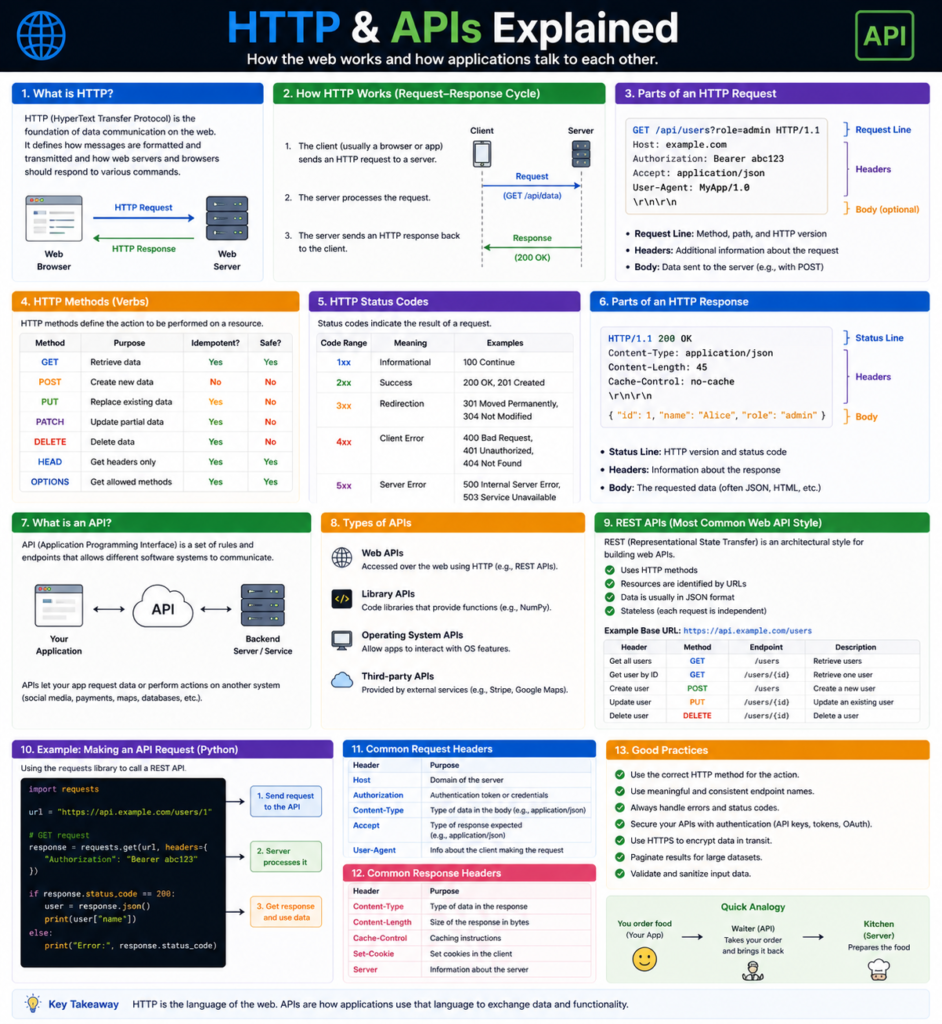

The Digital Handshake: HTTP & APIs Explained
Have you ever wondered how your phone knows the exact weather in a city thousands of miles away the moment you open an app? Or how you can use your Google account to log into a completely unrelated website with just one click? It feels like the digital world is a seamless, telepathic web where every device knows what the other is thinking.
In reality, there is no telepathy involved. It is a highly structured, incredibly fast conversation happening behind the scenes. This conversation is governed by two of the most critical technologies in modern history: HTTP & APIs Explained. If the internet is a global city, HTTP is the road system and traffic laws, while APIs are the specialized messengers delivering packages between buildings.
In this deep-dive guide, we are going to peel back the layers of the web. We will explore how “Request-Response” cycles work, why APIs are the backbone of the trillion-dollar app economy, and how you can start building your own connections. Whether you’re a total beginner or an intermediate developer looking to solidify your backend knowledge, you’re in the right place.
What is [HTTP & APIs Explained]?
Let’s start by defining our two protagonists. While they often work together, they serve very different purposes.
What is HTTP?
HTTP (HyperText Transfer Protocol) is the “language” of the web. It is a protocol—a set of rules—that determines how messages are formatted and transmitted across the internet. When you type a URL into your browser, you are using HTTP to ask a server for a specific file.
Think of HTTP as the Post Office. It doesn’t care what is inside your envelope; its only job is to make sure the envelope has the right address, the right stamp, and is delivered using the standard delivery route.
What is an API?
An API (Application Programming Interface) is a set of definitions and protocols for building and integrating application software. It allows one service to “talk” to another without knowing how that service is built internally.
Think of an API as a Translator at a global summit. If a French diplomat needs to speak to a Japanese diplomat, they don’t need to learn each other’s entire language and culture. They just need a translator who understands the “interface” for communication.
Why is it Important?
You might be thinking, “I just want to build a nice-looking website. Why do I need to know about protocols?” Here is why understanding HTTP & APIs Explained is the secret to becoming a high-level developer:
1. Modular Building
Modern apps aren’t built from scratch. If you want to add a map to your site, you don’t build a satellite system; you use the Google Maps API. If you want to accept payments, you use the Stripe API. Understanding APIs allows you to build “on the shoulders of giants.”
2. Universal Connectivity
APIs allow different platforms to share data. It’s why your fitness tracker can send data to your health insurance app, and why your fridge can tell your grocery app that you’re out of milk. This connectivity is the “Internet of Things” (IoT).
3. Career Advancement
In 2026, almost every developer role requires API knowledge. Whether you are working on the Frontend (consuming APIs) or the Backend (building them), this is the “bread and butter” of software engineering.
Core Concepts Explained: Step-by-Step
To master HTTP & APIs Explained, we need to look at the anatomy of a web conversation.
1. The Request (The Question)
Every HTTP interaction starts with a request from a Client (like your browser) to a Server. A request has four main parts:
- The URL: The address of the resource (e.g., /api/users/1).
- The Method (Verb): What do you want to do? (GET, POST, PUT, DELETE).
- Headers: Extra “metadata” (e.g., “I am a Chrome browser,” or “Here is my secret password”).
- Body: The actual data you are sending (usually for POST requests).
2. HTTP Methods (The Verbs)
- GET: “Give me some data.” (Reading a blog post).
- POST: “Create something new.” (Submitting a signup form).
- PUT: “Update this existing thing.” (Changing your profile picture).
- DELETE: “Get rid of this.” (Deleting a tweet).
3. The Response (The Answer)
The server processes your request and sends back a package. This package includes a Status Code.
- 200 OK: Everything went perfect!
- 201 Created: Success! The new data was saved.
- 404 Not Found: The address doesn’t exist.
- 500 Internal Server Error: The server’s brain crashed.
4. RESTful APIs
Most modern APIs follow a style called REST (Representational State Transfer). RESTful APIs are popular because they are “stateless” (the server doesn’t have to remember your past requests) and they use standard HTTP methods, making them incredibly predictable and easy to use.
Practical Examples: Fetching Data with an API
Let’s see HTTP & APIs Explained in a real coding context. We will use the fetch API in JavaScript to get a list of users from a “mock” (fake) API.
// A simple GET request to a public API
fetch('https://jsonplaceholder.typicode.com/users')
  .then(response => {
    if (!response.ok) {
        throw new Error('Network response was not ok');
    }
    return response.json(); // Convert the "raw" data into a JSON object
  })
  .then(data => {
    console.log("Here are the users we found:");
    console.log(data); // An array of user objects
  })
  .catch(error => {
    console.error('There was a problem with the API call:', error);
  });
In this example, your code acts as the client. It sends an HTTP GET request. The server replies with a 200 OK status and a body full of JSON (JavaScript Object Notation) data.
💡 Pro Tip: JSON is the “gold standard” format for APIs. It looks like a list of labels and values, making it easy for both humans and computers to read.
Common Mistakes to Avoid
- Ignoring Status Codes: Don’t just assume an API call worked. Always check if the status code is in the 200 range before trying to use the data.
- Security Leaks: Never put your API Keys (passwords for APIs) in your Frontend code. Hackers can easily steal them. Always use a Backend proxy to hide your keys.
- Over-fetching: Don’t ask an API for “all users” if you only need the name of one user. This slows down your app and wastes server resources.
- Synchronous Thinking: API calls take time (latency). Never write code that “waits” for an API without using async/await or Promises, or your whole website will freeze!
Pro Tips & Best Practices
- Use Versioning: When building an API, always start your URLs with /v1/. If you need to make big changes later, you can create /v2/ without breaking the apps of people still using version 1.
- Documentation is King: An API is only as good as its manual. Use tools like Swagger or Postman to create clear documentation so other developers know how to use your “translator.”
- Rate Limiting: If you build an API, don’t let one user call it 1,000 times a second. Implement rate limiting to protect your server from being overwhelmed.
- Test with Postman: Before writing any code, use a tool like Postman or Insomnia to test your API requests. It lets you see exactly what the server is sending back in a clean interface.
Real-World Use Cases
1. The Weather App
Your phone’s weather app doesn’t have a thermometer. It uses an HTTP GET request to an API (like OpenWeatherMap). The API returns a JSON object with the temperature and humidity, which the app then displays as a pretty icon.
2. “Login with Facebook/Google”
This uses a specialized API flow called OAuth. The website asks the Google API, “Is this user who they say they are?” Google’s API verifies your identity and sends back a “Token” (a digital pass) that lets you into the site.
3. Ride-Sharing (Uber/Lyft)
Uber is essentially a giant coordinator of APIs. It uses the Google Maps API for navigation, the Stripe API for payments, and its own internal APIs to match drivers with riders in real-time.
Mini Project: Your First API Interaction
Let’s do a quick “No-Code” project to see HTTP & APIs Explained in action.
- Open your browser and go to: https://api.github.com/users/octocat
- What do you see? You should see a page full of text that looks like this:
“login”: “octocat”, “id”: 583231, “avatar_url”: …- What just happened?
- Your browser sent an HTTP GET request to GitHub’s API.
- GitHub’s API looked up the user “octocat.”
- It sent back a JSON response with that user’s data.
This is exactly how professional apps work. They just use code to read that text instead of you looking at it in a browser!Frequently Asked Questions (FAQs)
1. What is the difference between HTTP and HTTPS?
The “S” stands for Secure. HTTPS encrypts the conversation between the client and the server. This prevents hackers from “eavesdropping” on the data (like credit card numbers) being sent across the network.
2. Can I build my own API?
Yes! Using frameworks like Express.js (Node.js), Django (Python), or Laravel (PHP), you can create your own server that listens for HTTP requests and serves data from a database.
3. What is a “Payload”?
In API terms, the payload is the actual “cargo” of the request or response. If you are posting a new blog comment, the text of that comment is the payload.
4. What is a Webhook?
A webhook is like a “Reverse API.” Instead of you asking the server for data, you give the server a URL and say, “Hey, whenever something happens (like a new sale), send me a request at this address.”
5. Why are some APIs free and others paid?
APIs cost money to run (server and bandwidth costs). Many companies offer a “Freemium” model where the first 1,000 calls are free, but you pay a small fee for higher volume.
Conclusion: Bridging the Digital Gap
Mastering HTTP & APIs Explained is like learning the secret handshake of the internet. You are no longer just building isolated “islands” of code; you are building bridges that connect your applications to the vast, global ecosystem of data and services.
When you understand how to request data properly, handle errors gracefully, and respect the protocols of the web, you become a developer who can solve complex, real-world problems. The web is a conversation—now you finally have the tools to join in.
Start practicing now! Try using the GitHub API project above with your own username (https://api.github.com/users/YOURUSERNAME). See what data the world can see about your profile!
Check our next guide on “Mastering JSON and Data Serialization” to learn how to manipulate the data you get back from your APIs!