
The Invisible Engine: A Deep Dive into How Servers Work
Have you ever stopped to wonder what actually happens when you type a URL into your browser and hit “Enter”? Within a fraction of a second, a beautiful website appears. It feels like magic, but behind that curtain of digital convenience lies a powerhouse of technology working tirelessly.
Understanding how servers work is like peering under the hood of a high-performance sports car. You might see the shiny exterior (the website), but the engine—the server—is what actually generates the power and provides the speed.
In this guide, we are going to demystify the world of backend infrastructure. We’ll break down the complex relationship between your computer and these digital giants, explore the different types of hardware involved, and show you why this knowledge is the “secret sauce” for anyone wanting to master modern technology. Whether you’re a curious beginner or an aspiring developer, you’re about to see the internet in a whole new light.
What is a Server? (A Clear Definition)
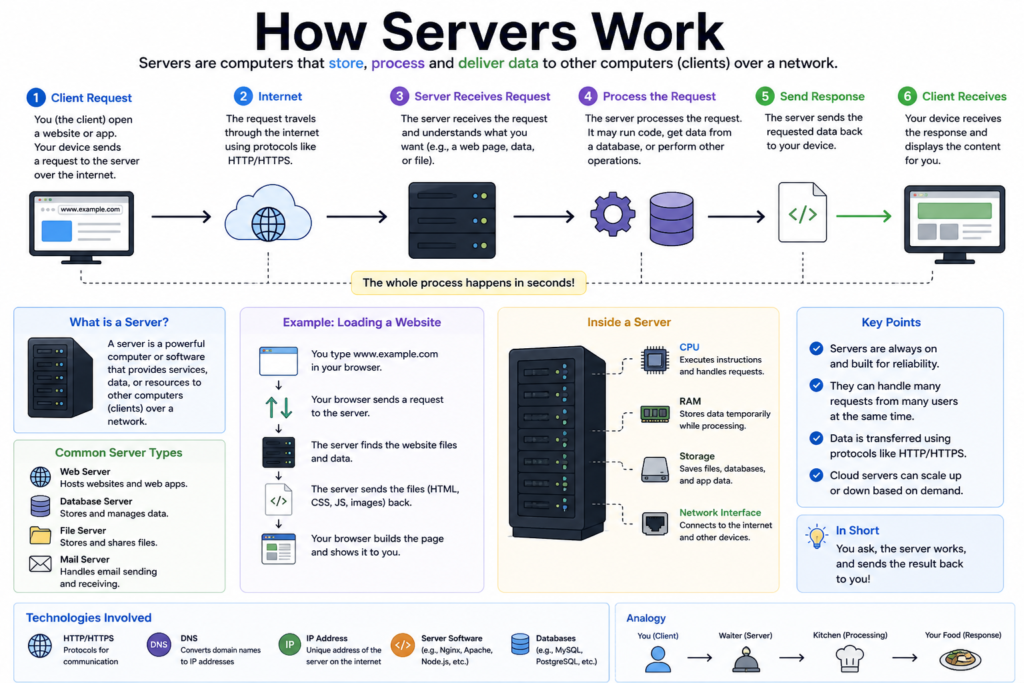
At its most basic level, a server is simply a computer program or a device that provides a service to another computer program and its user, also known as the client.
In the physical world, a server is often a high-powered computer sitting in a chilled room called a data center. However, “server” can also refer to the software running on that machine.
Think of a server as a restaurant waiter.
- You (the Client) sit down at a table and look at the menu (the website interface).
- You place an order (the Request) for a specific dish.
- The waiter (the Server) takes that order to the kitchen.
- The waiter brings the finished meal back to your table (the Response).
Without the waiter, your order never reaches the kitchen, and you never get your food. In the digital world, without the server, your browser would have nowhere to send its requests, and the internet would essentially be a collection of disconnected screens.
Why is Understanding How Servers Work Important?
You might think, “I just want to build websites; why do I need to know about the hardware?” Here is why how servers work is a foundational piece of knowledge:
1. Troubleshooting and Debugging
When a website goes down or a mobile app starts lagging, the problem is often server-side. If you understand the flow of data, you can pinpoint exactly where the “pipe” is leaking. Is it a database bottleneck? A DNS failure? Or is the server simply overwhelmed by traffic?
2. Security
Servers are the primary targets for hackers. Understanding how they manage permissions, handle encryption (SSL/TLS), and process user data is the first step toward building secure applications that protect user privacy.
3. Scalability
If your project suddenly goes viral, can your infrastructure handle it? Knowing how servers distribute workloads (Load Balancing) allows you to build systems that grow alongside your user base without crashing.
Core Concepts Explained: Step-by-Step
To truly grasp how servers work, we need to follow the “Request-Response” cycle from start to finish. Let’s walk through what happens when you visit a website.
Step 1: The Request (The “Knock on the Door”)
When you type www.example.com, your browser (the client) creates a request. But it doesn’t know where example.com lives yet. It only knows the name. It needs an address.
Step 2: The DNS Lookup (The “Phonebook”)
The request first goes to a DNS (Domain Name System) Server. This is essentially the internet’s phonebook. It translates the human-readable name into an IP Address—a string of numbers like 192.168.1.1.
Step 3: Establishing a Connection (The “Handshake”)
Once the IP address is found, your browser reaches out to that specific server. They perform a “TCP Handshake”—a quick digital greeting to ensure both sides are ready to communicate securely.
Step 4: The Server Processes the Request
The server software (like Apache, Nginx, or Node.js) looks at the request. It says, “Ah, Alice wants the homepage.” It then:
- Fetches the HTML file from the hard drive.
- Asks the Database for the latest blog posts.
- Combines everything into a neat package.
Step 5: The Response (The “Delivery”)
The server sends that package back through the internet cables to your computer. Your browser then reads the HTML, CSS, and JavaScript and renders the visual website you see on your screen.
💡 Pro Tip: This entire 5-step process usually happens in less than 500 milliseconds. If it takes longer than 2 seconds, most users will leave the site!
The Different Types of Servers
Not all servers are created equal. Depending on the task, a server might be configured very differently.
Server Type What it Does Real-World Example Web Server Delivers HTML/CSS/JS to browsers. Apache, Nginx Database Server Stores and organizes massive amounts of data. MySQL, PostgreSQL, MongoDB Mail Server Handles the sending and receiving of emails. Microsoft Exchange, Gmail’s backend File Server Stores files for multiple users to access. Dropbox, Google Drive Game Server Synchronizes players in a multiplayer world. Fortnite or Minecraft servers Practical Examples: A Simple Server in Node.js
You don’t need a massive data center to see a server in action. You can actually turn your own laptop into a server with just a few lines of code.
Here is a basic example using Node.js to create a web server that says “Hello World” to anyone who visits it.
const http = require('http');

// Define the server logic
const server = http.createServer((req, res) => {
  res.statusCode = 200; // Success code
  res.setHeader('Content-Type', 'text/plain');
  res.end('Hello! You have reached the server.\n');
});

// Tell the server to listen for requests on Port 3000
server.listen(3000, '127.0.0.1', () => {
  console.log('Server is running at http://127.0.0.1:3000/');
});
When you run this code, your computer starts “listening” for incoming digital knocks. If you go to your browser and type localhost:3000, the server will respond with the message. This is exactly how servers work on a global scale—just with much more power!
Common Mistakes to Avoid
Even intermediate developers often struggle with these server-side concepts:
1. Mixing Up Client-Side and Server-Side
Code that runs in the browser (HTML/CSS) is client-side. Code that runs on the server (PHP/Python/Node) is server-side. A common mistake is trying to access a user’s local file system from a server-side script. For security reasons, servers can’t “see” inside the user’s computer!
2. Ignoring Latency
If your server is in New York and your user is in Tokyo, the data has to travel across the ocean. Many developers forget to account for this physical distance.
- Solution: Use a CDN (Content Delivery Network) to keep copies of your server’s data closer to your users.
3. Hardcoding IP Addresses
Never hardcode an IP address in your app. Servers move, and IP addresses change. Always use domain names and environment variables.
Pro Tips & Best Practices
To manage servers like a pro, keep these tips in mind:
- Implement Caching: Don’t make the server do the same work twice. If a user asks for a page that hasn’t changed, serve them a “saved” (cached) version to save CPU power.
- Monitor Everything: Use tools like New Relic or Datadog to watch your server’s health. You want to know it’s crashing before your users do.
- Security First: Always keep your server’s operating system updated. Old software is an open door for exploits.
- Automate Backups: Hard drives fail. It’s not a matter of “if,” but “when.” Ensure your server automatically backs up its data every day.
Real-World Use Cases: The Power of Servers
1. Streaming Services (Netflix/YouTube)
How do millions of people watch 4K video at the same time? These companies use “Media Servers” that are optimized for high-speed data transfer. They split the movie into thousands of tiny chunks and serve them one by one to prevent buffering.
2. E-commerce (Amazon)
During Black Friday, server demand spikes. Amazon uses “Auto-scaling,” where their cloud servers automatically create “clones” of themselves to handle the extra shoppers, then shut down when the rush is over to save money.
3. Financial Trading
In Wall Street, “High-Frequency Trading” servers are placed physically close to the exchange’s servers. Why? Because even the speed of light in a fiber optic cable is too slow for them. Every millimeter of cable matters!
Mini Project: Build Your Own Local File Server
Want to share files between your phone and your laptop without using a cable or the cloud? You can use a built-in server tool in Python.
- Open your Terminal (or Command Prompt).
- Navigate to a folder with some photos or documents.
- Type the following command:
python -m http.server 8000 - Now, on your phone, type your computer’s IP address followed by :8000 into the browser.
You just turned your computer into a File Server! You can now see and download those files on your phone. This is a perfect example of the “Client-Server” relationship in action.
Frequently Asked Questions (FAQs)
1. Does a server need to stay on 24/7?
Yes! If the server is turned off, the service it provides (like your website) becomes unavailable. This is why data centers have massive backup generators and multiple internet connections.
2. Can my personal computer be a server?
Absolutely. Any computer can be a server. However, personal computers aren’t designed to stay on for years at a time, nor do they have the high-speed upload capacity required to serve thousands of visitors.
3. What is “The Cloud”?
The Cloud is just someone else’s server. Instead of buying a physical machine and putting it in your closet, you rent space on a server owned by Amazon (AWS), Google (GCP), or Microsoft (Azure).
4. What is a “Headless” Server?
Most servers don’t have a monitor, keyboard, or mouse. Developers manage them remotely using a text-based interface called the Command Line (via SSH). This is known as running “headless.”
5. Why do servers need to be in cold rooms?
Processing millions of requests generates a lot of heat. If a server gets too hot, it will slow down to protect itself or even catch fire. Cooling is one of the biggest costs of running a data center.
Conclusion: Mastering the Digital Backbone
Understanding how servers work is more than just a technical skill—it’s a change in perspective. Once you realize that the internet is just a giant network of computers talking to each other, the “magic” of technology starts to look like a logical, beautiful system that you can control.
Whether you are building a simple blog or the next big social media platform, the server is your foundation. Respect its limits, optimize its performance, and keep it secure. As you continue your coding journey, you’ll find that the best developers aren’t just great at writing code; they are great at understanding the environment where that code lives.
Start practicing now! Try the Python mini-project mentioned above. Once you see your own files appearing on another device, you’ll truly understand the power of the server.
Check our next guide on Cloud Infrastructure to learn how to deploy your apps to the world!