
The Architect’s Blueprint: Understanding Functions and Scope
Imagine you are running a world-class restaurant kitchen. If every chef had to go outside to the farm, harvest wheat, grind it into flour, and then bake bread every time a customer ordered a sandwich, the kitchen would collapse in minutes. Instead, you have a specific station for baking bread. Whenever a sandwich is needed, the head chef simply calls out for bread, and that station delivers a perfect loaf.
In the programming world, functions and scope are the stations and the rules of your kitchen. They allow you to bundle complex tasks into reusable “recipes” and ensure that the “salt” meant for the soup doesn’t accidentally end up in the chocolate cake.
Mastering functions and scope is the exact moment a beginner starts thinking like a professional engineer. It is the shift from writing a long, confusing list of instructions to building a modular, efficient, and scalable system. In this guide, we are going to dive deep into how these two concepts work together to keep your code clean, readable, and—most importantly—bug-free.
What are Functions and Scope?
To get started, we need a crystal-clear definition of these two inseparable partners.
What is a Function?
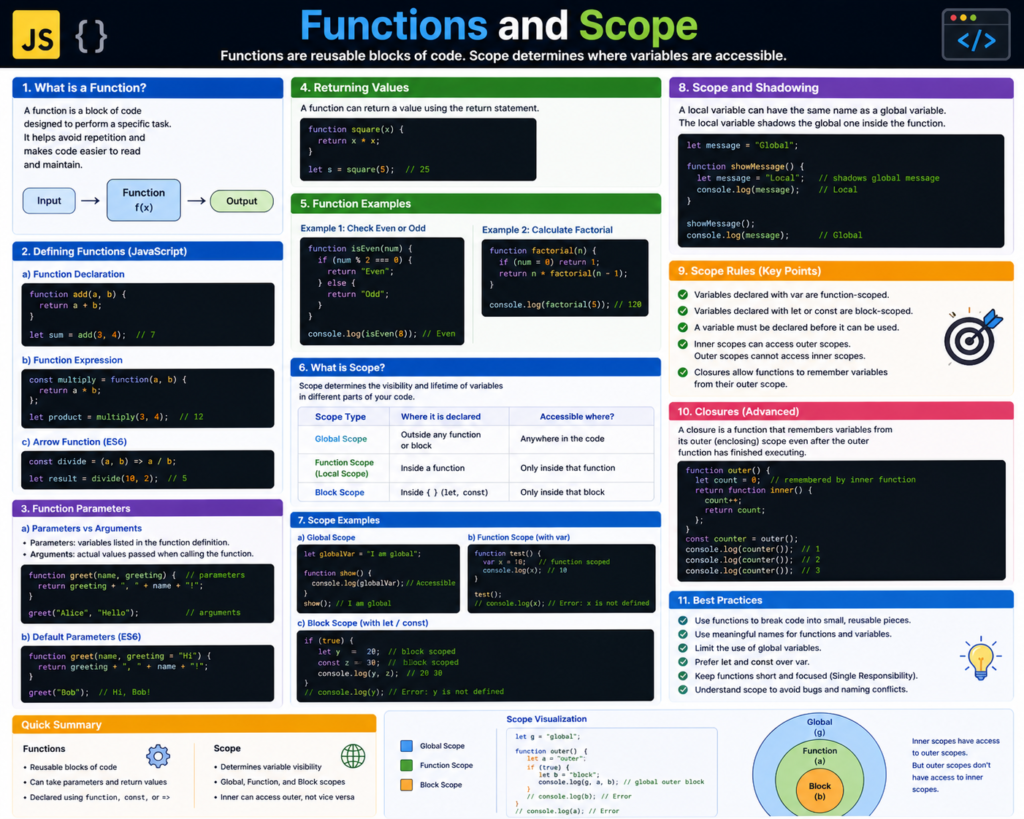
A function is a self-contained block of code designed to perform a particular task. It is a reusable “mini-program” within your main program. You give it an input (parameters), it performs a process, and it gives you back an output (return value).
What is Scope?
Scope is the set of rules that determines where your variables can be reached. It defines the “visibility” of your data. Not every part of your program should be able to see every variable. Scope creates boundaries that protect your data from being accidentally changed by unrelated parts of your code.
Why are Functions and Scope Important?
Why don’t we just write one long file of code from top to bottom? Here is why functions and scope are non-negotiable for modern development:
1. The “Don’t Repeat Yourself” (DRY) Principle
If you find yourself writing the same ten lines of code three times, you need a function. By wrapping those lines in a function, you only have to write them once. If you need to fix a bug later, you fix it in one place, and it updates everywhere.
2. Cognitive Load Management
A program with 5,000 lines of flat code is impossible for a human to hold in their head. By breaking it into functions with clear names like calculateTax() or validatePassword(), you make the code self-explanatory. You don’t need to know how the tax is calculated to understand that the function is calculating it.
3. Preventing Data Corruption
Without scope, any part of your code could change the userBalance variable. This is a security and stability nightmare. Scope allows you to “hide” variables inside functions so they can’t be touched by mistake.
Core Concepts Explained: Step-by-Step
Let’s break down the mechanics of how these tools work in the real world.
1. Declaring and Calling Functions
Think of declaring a function as writing a recipe. It doesn’t “cook” anything yet; it just sits in the book. “Calling” the function is when you actually start cooking.
- Declaration: function makeCoffee() { … }
- Call: makeCoffee();
2. Parameters and Arguments
Parameters are the “ingredients” your function needs.
- Parameters: The placeholders (e.g., beans, water).
- Arguments: The actual values you pass in (e.g., “Arabica”, 250ml).
3. The Return Statement
The return keyword is the “delivery window” of the function. It sends the result back to the part of the program that asked for it. Without a return, the function finishes its work, but the rest of the program never sees the result.
4. Global vs. Local Scope
- Global Scope: Variables defined outside of any function. They are like public parks—anyone can enter and change things.
- Local Scope: Variables defined inside a function. They are like a private home. People outside can’t see what’s inside, and once the function finishes running, the variables inside are “destroyed” to save memory.
Practical Examples: Scope in Action
Let’s look at a common scenario in JavaScript to see how scope protects our variables.
let globalName = "Alice"; // Global Scope

function greetUser() {
    let localGreeting = "Hello"; // Local Scope
    console.log(localGreeting + ", " + globalName);
}

greetUser(); // Output: "Hello, Alice"

// console.log(localGreeting); // ERROR! localGreeting is not defined out here.
In this example, the function can see the global variable globalName, but the outside world cannot see localGreeting. This is the “One-Way Mirror” of scope: inner circles can see out, but outer circles can’t see in.
Common Mistakes to Avoid
Even seasoned developers occasionally get tripped up by functions and scope. Keep an eye out for these:
1. The “Global Pollution” Trap
It’s tempting to make every variable global so you can reach it easily. This is a huge mistake. As your project grows, you will accidentally give two different global variables the same name, leading to bugs that are nearly impossible to track down.
- The Fix: Always use the most restrictive scope possible.
2. Side Effects
A function should ideally do one thing and return a result. If a function secretly changes a global variable while it’s running, that is a “side effect.” Side effects make your code unpredictable.
- The Fix: Pass data into functions as arguments and get data out via return.
3. Forgetting to Return
A classic beginner mistake is calculating a value inside a function but forgetting to return it. The code will run, but the variable you try to assign the result to will be undefined.
Pro Tips & Best Practices
- Function Naming: Use verbs. getUserData is better than user. isEmailValid is better than check.
- The Single Responsibility Principle: A function should do one thing. If your saveUser() function also sends an email, processes a payment, and updates the weather, it’s time to break it into four smaller functions.
- Use const for Scope Safety: In modern JavaScript, use const and let instead of var. const prevents variables from being reassigned, and let respects “block scope” (variables restricted to if statements and loops), making your code much safer.
- Pure Functions: Aim for “pure” functions—functions that always produce the same output for the same input and don’t change anything outside of themselves. They are much easier to test and debug.
Real-World Use Cases
1. E-commerce Pricing
When you go to checkout, a function called calculateTotal() might take your cartItems, taxRate, and shippingFee as arguments. It processes them and returns the final price. The specific logic for calculating tax stays “hidden” in its own scope to avoid interfering with the shipping logic.
2. Game Development
In a video game, you might have a function called applyDamage(player, amount). This function is called every time a player gets hit. By using a function, the game developers can easily add a “shield” mechanic by changing just that one function, rather than hunting through thousands of lines of code.
3. Data Science
Data scientists use functions to “clean” data. They might write a function that takes a messy spreadsheet, removes all the empty rows, and returns a clean version. This allows them to run the same cleaning process on thousands of different files with a single line of code.
Mini Project: The “Budget Tracker” Logic
Let’s build a small piece of logic that uses functions and scope to manage a bank balance.
The Plan:
- Set a global balance.
- Create a function to add money.
- Create a function to spend money (with a check for sufficient funds).
The Code (JavaScript):
let accountBalance = 1000; // Global Balance

function deposit(amount) {
    accountBalance += amount;
    return "New balance: $" + accountBalance;
}

function withdraw(amount) {
    if (amount > accountBalance) {
        return "Insufficient funds!";
    }
    accountBalance -= amount;
    return "Withdrew $" + amount + ". Remaining: $" + accountBalance;
}

console.log(withdraw(200));  // Success
console.log(withdraw(2000)); // Logic Check: Insufficient funds
console.log(deposit(500));    // Success
In this project, accountBalance is the source of truth. The functions provide a “controlled interface” to change that balance, ensuring we can’t spend money we don’t have!
Frequently Asked Questions (FAQs)
1. What is “Block Scope”?
Introduced in modern programming, block scope means a variable is only visible within the nearest set of curly braces {}. This applies to if statements, for loops, and while loops. It’s even more restrictive than local scope!
2. Can a function call another function?
Yes! This is called function composition. In fact, complex programs are usually just one big function that calls many smaller ones.
3. What is an Anonymous Function?
An anonymous function is a function without a name. They are often used as “throwaway” functions that you pass into other functions, like telling a list to “run this logic on every item.”
4. Why does my variable “disappear” after the function ends?
This is due to Garbage Collection. Once a function finishes, the computer realizes it no longer needs the local variables inside that function. It wipes them from memory to keep your program fast.
5. What is “Hoisting”?
In some languages like JavaScript, you can sometimes call a function before you define it in the code. This is because the computer “hoists” function declarations to the top of the file before running it. However, it’s best practice to always define your functions before you use them.
Conclusion: Organizing Your Logic
Understanding functions and scope is the key to writing code that doesn’t just work, but shines. You have moved from someone who simply gives instructions to a digital architect who builds structured, secure, and reusable systems.
By using functions to organize your tasks and scope to protect your data, you are creating software that is a joy to read and a breeze to maintain. These concepts are the bedrock of everything from web development to artificial intelligence. Don’t worry if it feels a little abstract at first—every time you write a function, your brain gets better at seeing the patterns.
Start practicing now! Take a look at a script you’ve written recently. Can you find three lines of code that are used twice? Turn them into a function. Can you move a global variable inside a function to make it “private”?
Check our next guide on “Advanced Closures and Callbacks” to take your functional programming to the next level!