
Mastering Logic: A Deep Dive into Conditions and Loops in Python
Imagine you are driving a car. As you approach a traffic light, your brain performs a quick check: If the light is green, you continue driving. If the light is red, you stop. Now, imagine you are driving on a long highway with ten consecutive traffic lights. Instead of manually deciding at every single pole, you follow a “loop” of behavior—approaching, checking, and acting—until you reach your destination.
In the world of software development, conditions and loops in Python are exactly like those driving decisions. They represent the “brain” and the “stamina” of your code. Without conditions, your program would just run blindly from top to bottom, unable to adapt to different situations. Without loops, you would have to write the same line of code a thousand times to perform repetitive tasks.
In this exhaustive guide, we are going to explore how to master these control flow structures. We will move beyond basic syntax to understand the “why” behind the logic, using simple analogies and professional-grade examples. Whether you are typing your first if statement or you are an intermediate coder looking to optimize your logic, this article will provide the clarity you need to build intelligent, efficient Python applications.
What are Conditions and Loops in Python?
Let’s start with a clear, technical-yet-friendly definition.
The Logic of Conditions
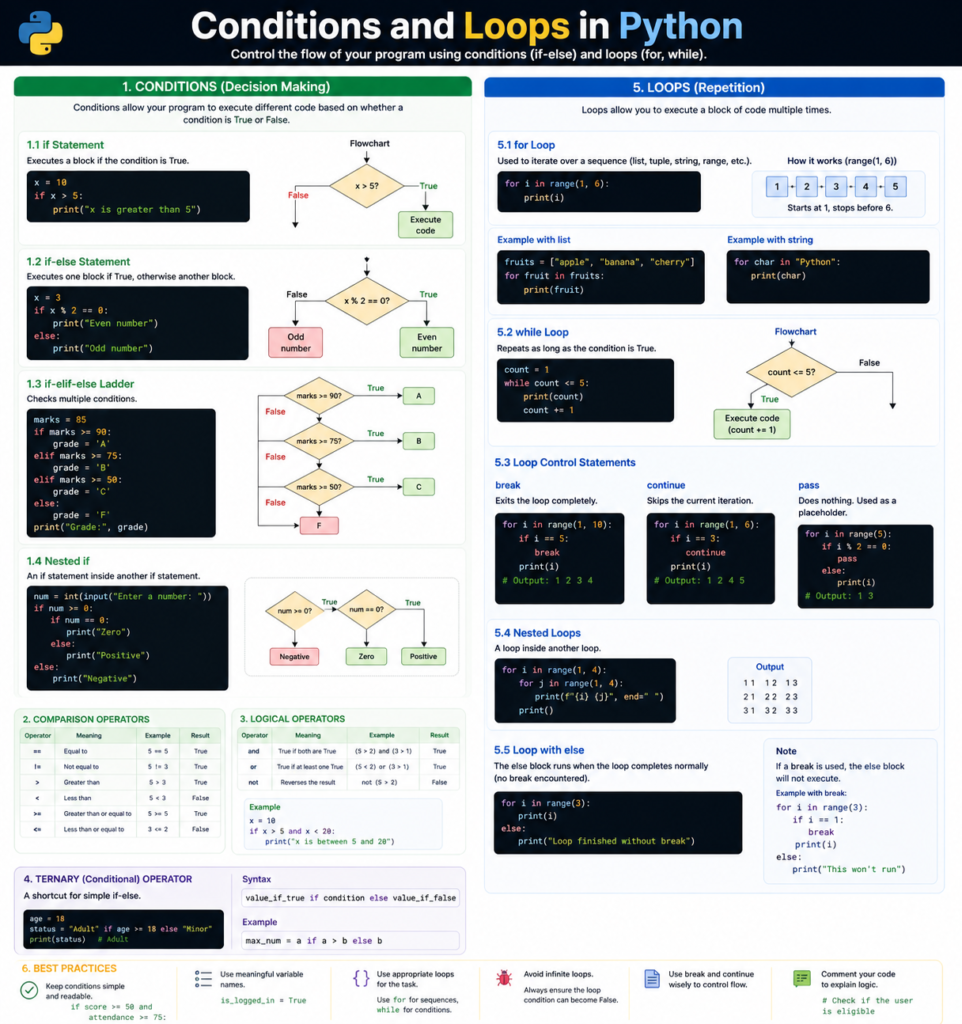
A condition is a fork in the road. It uses Boolean logic (True or False) to decide which path the computer should take. In Python, we use if, elif (else if), and else to create these branches. If a specific requirement is met, the code inside that block runs; otherwise, the computer skips it.
The Power of Loops
A loop is a repetitive cycle. It allows you to run a block of code multiple times without rewriting it. Python primarily uses two types of loops:
- For Loops: Used when you know how many times you want to repeat something (e.g., “Do this for every item in this list”).
- While Loops: Used when you want to repeat something as long as a certain condition remains true (e.g., “Keep running while the battery is above 10%”).
Together, conditions and loops in Python form the backbone of “Control Flow”—the order in which individual statements, instructions, or function calls are executed.
Why are Conditions and Loops Important?
Why can’t we just write a straight list of instructions? Here is why these concepts are the lifeblood of programming:
1. Automation and Efficiency
Computers are designed to do the “boring” stuff. If you need to send an email to 10,000 customers, you don’t write the “send” command 10,000 times. You write it once inside a loop and let the computer handle the repetition in milliseconds.
2. Decision-Making Capability
A smart program needs to react to input. A banking app must decide: If the withdrawal amount is less than the balance, allow it. Else, show an error. Conditions allow your software to feel “intelligent” and responsive to user needs.
3. Handling Big Data
When you are dealing with millions of records in a database, you use loops to sift through the data and conditions to filter out exactly what you need. This combination is what makes data science and machine learning possible in Python.
Core Concepts Explained: Step-by-Step
Let’s break down the mechanics of conditions and loops in Python starting with the basics and moving to more advanced logic.
1. The If-Elif-Else Chain
This is the most common way to handle decisions. Python uses indentation (whitespace) to define these blocks.
- if: The initial check.
- elif: Short for “else if.” You can have as many of these as you want to check multiple specific conditions.
- else: The “catch-all” for when none of the above conditions are met.
2. The For Loop (Iterating over a Sequence)
The for loop is Python’s favorite tool for moving through lists, strings, or ranges.
fruits = ["apple", "banana", "cherry"]
for fruit in fruits:
    print(f"I love eating {fruit}")
3. The While Loop (The Continuous Check)
The while loop is more “dangerous” but highly effective. It keeps going until its condition turns False.
countdown = 5
while countdown > 0:
    print(countdown)
    countdown -= 1 # Crucial! Without this, the loop never ends.
print("Blast off!")
4. Break and Continue
Sometimes you need to interrupt a loop.
- break: Stops the loop entirely and exits.
- continue: Skips the rest of the current turn and jumps straight to the next iteration.
Practical Examples: Real Coding Scenarios
Let’s look at how we combine conditions and loops in Python to solve a common problem: A Login Security Check.
The Goal: Give a user three attempts to enter the correct password.
correct_password = "PythonMaster123"
attempts = 3

while attempts > 0:
    user_input = input("Enter your password: ")

    if user_input == correct_password:
        print("Access Granted! Welcome back.")
        break # Exit the loop immediately
    else:
        attempts -= 1
        if attempts > 0:
            print(f"Incorrect. You have {attempts} attempts left.")
        else:
            print("Account locked. Please contact support.")

# This code uses a while loop for repetition and nested if-else statements for logic.
Common Mistakes to Avoid
Even seasoned Pythonistas fall into these traps. Here is what to watch out for:
1. The Infinite Loop
If you write a while loop but forget to change the variable that the loop is checking, it will run forever, freezing your computer.
- The Fix: Always ensure the condition will eventually become False.
2. Indentation Errors
Python doesn’t use curly braces like Java or C++. It uses spaces. One extra space or a missing tab will throw an IndentationError.
- The Fix: Use a consistent code editor (like VS Code or PyCharm) that handles tabs for you.
3. Using if instead of elif
If you use multiple if statements in a row, Python checks every single one. If you use if-elif, Python stops checking as soon as it finds a match.
- The Fix: Use elif for mutually exclusive conditions to make your code faster.
Pro Tips & Best Practices
- List Comprehensions: For intermediate readers, instead of a 4-line for loop, you can often use a one-liner.
- Example: squared_numbers = [x**2 for x in range(10)]
- The range() Function: Use range(start, stop, step) to control exactly how your loop behaves without creating a physical list in memory.
- Use Descriptive Variable Names: Instead of for i in list:, use for customer in customer_list:. It makes your logic human-readable.
- The else in Loops: Did you know Python loops can have an else block? It runs only if the loop finished “naturally” (without hitting a break).
💡 Pro Tip: If you find yourself nesting more than three levels of if statements, your code is getting “smelly.” Try breaking the logic into a separate function to keep it clean.
Real-World Use Cases
How do conditions and loops in Python power the modern world?
1. Cybersecurity (Brute Force Protection)
Firewalls use loops to monitor incoming traffic. If an IP address tries to log in 100 times in a minute, the condition triggers a “Block” action.
2. Finance and Trading
Trading bots use infinite while loops to constantly check the price of Bitcoin. If the price drops below a certain threshold, the loop executes a “Buy” order.
3. Video Games
Every game has a “Main Game Loop.” It runs 60 times per second (60 FPS), checking if the player pressed a key, if an enemy is nearby, and then rendering the frame.
Mini Project: The “Smart Grocery List”
Let’s build a practical application that uses everything we’ve learned.
The Plan: Create a script that asks a user for items. If the item is already on the list, skip it. If they type “done,” stop the loop and print the final sorted list.
The Code:
grocery_list = []

print("--- Smart Grocery List Builder ---")
print("Type 'done' when you are finished.")

while True:
    item = input("Add item: ").lower()

    if item == 'done':
        break

    if item in grocery_list:
        print(f"Wait, you already have {item} on your list!")
        continue

    if item == "":
        print("You can't add an empty item!")
        continue

    grocery_list.append(item)
    print(f"Added {item}. Current count: {len(grocery_list)}")

grocery_list.sort()
print("\nYour Final List:")
for index, item in enumerate(grocery_list, 1):
    print(f"{index}. {item.capitalize()}")
Frequently Asked Questions (FAQs)
1. Is a for loop faster than a while loop?
In Python, for loops are generally slightly faster because they are optimized for iterating over existing collections. while loops require more manual overhead (like incrementing a counter).
2. Can I put a loop inside another loop?
Yes! This is called a Nested Loop. It’s useful for working with grids (like a chessboard) or lists within lists. Just be careful—nested loops can slow down your program if the data is massive.
3. What is the difference between == and is?
This is a common beginner mistake. == checks if values are equal (e.g., is 5 equal to 5?). is checks if they are the exact same object in the computer’s memory. For conditions, always use == unless you have a specific reason not to.
4. How do I stop a loop that is stuck?
If you accidentally start an infinite loop in your terminal, press Ctrl + C to force-stop the program.
5. Why does Python use colons : after conditions?
The colon tells Python: “The condition is finished, and the following indented block is the code that should run if it’s true.” It helps both the computer and humans read the structure clearly.
Conclusion: Designing the Logic of Tomorrow
Mastering conditions and loops in Python is the single biggest step you can take toward becoming a proficient developer. You are no longer just writing text; you are designing a logical flow that can think, react, and work tirelessly on your behalf.
By combining the decision-making power of if statements with the tireless repetition of for and while loops, you can solve almost any problem in the digital world. The journey doesn’t end here—the more you practice, the more elegant your logic will become.
Start practicing now! Try modifying the “Smart Grocery List” project above to include quantities (e.g., “3 Apples”).
Check our next guide on “Mastering Python Lists and Dictionaries” to learn how to store more complex data for your loops to handle!