
Ever wondered how your typing turns into software? Discover exactly how computers understand code, from compilers and interpreters to binary and CPU logic.
How Computers Understand Code: The Secret Journey from Typing to Thinking
Have you ever sat in front of your laptop, typed a few lines of Python or JavaScript, hit “Run,” and marveled at how the computer instantly knew what to do? It feels like magic. You type print(“Hello World”), and the screen obeys.
But here is the mind-blowing truth: Computers don’t understand English. They don’t even understand “code” in the way we think of it. To a computer, your beautifully written script is just a collection of useless text.
So, how does that text turn into a video game, a banking app, or a simple “Hello”? In this guide, we are going to explore the fascinating world of how computers understand code. We’ll travel from the high-level languages humans love down to the microscopic electrical pulses that actually do the work.
By the end of this article, you won’t just be a person who “writes code”—you’ll be someone who truly understands the machinery of the digital age.
What is “How Computers Understand Code”?
To define how computers understand code, we have to look at it as a translation process. Imagine you are trying to explain a complex recipe to a robot that only understands “on” and “off.” You can’t just shout “Bake a cake!” You need a series of translators.
Computers are built out of billions of tiny switches called transistors. These switches only have two states: On (represented by 1) and Off (represented by 0). This is called Binary.
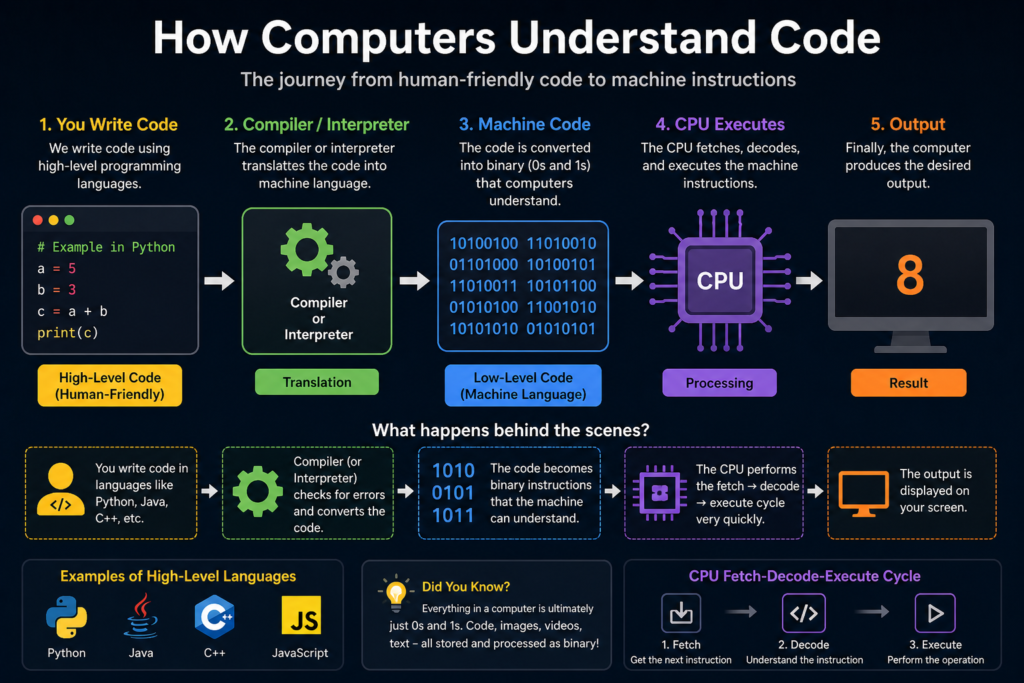
The process of “understanding code” is actually the process of taking High-Level Language (what we write) and translating it into Machine Code (the 1s and 0s) that the Central Processing Unit (CPU) can execute.
Why is it Important?
You might think, “I just want to build websites, why do I need to know about transistors?”
Understanding how computers understand code makes you a significantly better developer for several reasons:
- Debugging Mastery: When you know how the computer processes data, you can predict where it will fail.
- Performance Optimization: You’ll understand why some code runs faster than others (e.g., why nested loops are “expensive” for the CPU).
- Language Choice: You’ll finally understand the difference between “compiled” languages like C++ and “interpreted” languages like Python.
- Empathy for the Machine: You’ll stop seeing the computer as a “magic box” and start seeing it as a logical tool, which reduces the frustration of coding.
Core Concepts Explained: The Layers of Translation
To understand the journey of code, we need to look at the “Software Stack.” It’s like an onion with many layers.
1. The High-Level Language (The Human Layer)
This is where you live. Languages like Python, Ruby, and Java are designed to be readable by humans. They use words like if, while, function, and return.
2. The Compiler or Interpreter (The Translator)
This is the most critical step in how computers understand code. Since the CPU can’t read your Python script, it needs a middleman.
- Compilers: Take your entire project and translate it all at once into a permanent “executable” file (like an .exe). Think of this as translating a whole book into another language before giving it to a reader.
- Interpreters: Translate and execute your code line-by-line, on the fly. This is like having a live translator at a UN meeting whispering in the listener’s ear.
3. Assembly Language (The Bridge)
Before code becomes raw 1s and 0s, it often passes through Assembly. This is a low-level language that corresponds directly to the CPU’s instructions but uses short words like MOV (move data), ADD (add numbers), and PUSH.
4. Machine Code and Binary (The Reality)
Finally, we reach the bottom. Machine code is a string of binary digits. The CPU sees 10110000 01100001 and knows exactly which electrical gates to open or close to perform an addition.
Practical Examples: From Source to Silicon
Let’s look at a simple math operation: 2 + 3 = 5.
In Python (High-Level)
result = 2 + 3This is very easy for us to read. But the computer sees this as a “statement” that needs to be parsed.
How the Interpreter Processes It
- Lexical Analysis: The interpreter breaks the line into “tokens”: result, =, 2, +, 3.
- Parsing: It builds a tree structure to understand the logic (we’re adding two integers and storing them in a variable).
- Code Generation: It converts this logic into instructions for the CPU.
In Assembly (Low-Level)
The CPU can’t do “result = 2 + 3” in one go. It has to do it in tiny steps:
MOV EAX, 2   ; Put the number 2 into a "bucket" called EAX
ADD EAX, 3   ; Add 3 to whatever is in that bucket
In Binary (The CPU Level)
The actual electrical pulses hitting the CPU might look like:
10111000 00000010 00000101
Common Mistakes to Avoid
- Thinking the Computer is “Smart”: Computers are actually very “dumb.” They do exactly what you say, not what you meant. If you tell a computer to “walk until you hit a wall” but forget to tell it to “stop,” it will try to walk through the wall forever.
- Ignoring Memory Management: Because computers use physical “buckets” (RAM) to store code, you can’t just store infinite data. Intermediate developers often forget that every variable takes up physical space in the machine.
- Mixing up Compilers and Interpreters: Remember, C++ is fast because it’s pre-translated (compiled). Python is slower because it’s translated as it runs (interpreted). Choose your tool based on the job!
💡 Pro Tip: If you want to see how your code is being “understood” in real-time, use a tool like Godbolt (Compiler Explorer). It shows you exactly what your C++, Rust, or Go code looks like in Assembly.
Pro Tips & Best Practices
Write Code for Humans, Not Just Machines
While it’s important to know how computers understand code, remember that humans are the ones who have to maintain it. Use clear variable names. The compiler doesn’t care if you call a variable x or user_account_balance, but your teammates will!
Understand the “Abstraction Layer”
Programming is the art of building layers. You don’t need to think about binary when writing a website, but you should know that those layers exist. When things get slow or buggy, “peeking” one layer down often reveals the answer.
Learn one “Low-Level” Language
Even if you are a Web Developer, spending a weekend learning the basics of C or Rust will change how you view coding. It forces you to think about memory, pointers, and how the computer physically handles data.
Real-World Use Cases
1. High-Frequency Trading
In the stock market, milliseconds matter. Developers use compiled languages (C++) and minimize the “translation” time so the computer understands the “buy” order faster than any human possibly could.
2. Embedded Systems (Your Microwave)
The code in your microwave is tiny. There is no room for a heavy Python interpreter. Developers write code that is very close to the machine level so it can run on a tiny, cheap processor.
3. Web Browsers
Chrome and Firefox use “Just-In-Time” (JIT) compilation. They take JavaScript (which is interpreted) and “compile” the parts you use most often into machine code while you are browsing to make the page feel snappy.
Mini Project: Manual Translation
To truly grasp how computers understand code, try this “Human Compiler” exercise:
- Write a simple “Algorithm” in English (e.g., “If it is raining, take an umbrella. If not, wear sunglasses.”)
- Translate to “Pseudo-code”:
   IF raining == True:
      ACTION = "Umbrella"
   ELSE:
ACTION = "Sunglasses"- Translate to “Binary” (Simplified): Decide that raining is bit 1. True is 1, False is 0.
Decide that Umbrella is 10 and Sunglasses is 01.
Your “Machine Code” becomes: 1110 (Raining is True, Action is 10).
By doing this, you’ve just performed the exact job of a compiler!
Frequently Asked Questions (FAQs)
1. Does a computer actually “think” when it runs code?
No. A computer is a series of “logic gates.” It is more like a very complex water pipe system where the “code” determines which valves are open. There is no conscious thought, only electrical flow.
2. What is a “Syntax Error” at the machine level?
A syntax error happens during the translation phase. The compiler or interpreter looks at your code and says, “I don’t have a translation for this word.” It’s like a translator seeing a word they’ve never heard—they have to stop the process.
3. Why don’t we just write everything in Machine Code?
Humans used to! It was called using “punch cards.” It is incredibly slow, prone to errors, and almost impossible to read. We created high-level languages so we could solve problems instead of managing 1s and 0s.
4. Is Binary the only way?
For now, yes. Digital computers are based on electricity being “on” or “off.” However, Quantum Computers use “Qubits,” which can be in multiple states at once. That will completely change how computers “understand” information!
5. What is the CPU’s “Instruction Set”?
Each CPU (like Intel’s x86 or Apple’s M1) has a specific “dictionary” of commands it understands. This is why a program built for a Windows PC won’t run directly on an Android phone—they speak different dialects of Machine Code.
Conclusion
Understanding how computers understand code is the key to moving from a “coder” to a “computer scientist.” It’s the realization that underneath the pixels and the buttons, there is a magnificent, logical dance of electricity.
Your code is the bridge between human creativity and mechanical execution. By writing better, cleaner code, you are making that translation easier and more efficient for the machine. The better you understand the “engine,” the faster you can drive.
Start practicing now! Next time you write a line of code, take a second to visualize it turning into Assembly, then into binary, and finally into a tiny pulse of electricity inside your processor. You aren’t just typing; you are conducting an orchestra of billions of transistors.
Check our next guide on “Memory Management and RAM” to see where your code lives!